

Sign up for creative credits · Buy 2+ for 10% extra permanent credits

Seedance 2.5
0/2500
Public Visibility
Required Credits
100
My Videos

Seedance 2.5 AI Video Generator

Shape your next scene with Seedance 2.5

Build a story around one visual idea in Seedance 2.5. A product emerging into the light, a character noticing something off screen or a location revealed by the camera can each become a clear opening. Prepare the subject, reference materials and intended ending before choosing the settings shown in the workspace.

Seedance 2.5
Seedance 2.5 Text to Video|Seedance 2.5 Image to Video|Reference-guided video creation|Camera and motion direction

Create your next video in three focused steps

Build a clear Seedance 2.5 video brief in three steps: describe the scene, add purposeful references, then review and refine the result. Keep one main action and one visual goal in each shot.

1

1. Describe the scene

Choose a model and describe the subject, action, environment and camera. Keep one main action, then add the style and lighting that serve the scene.

2

2. Choose purposeful references

Add references through the model's supported inputs. Explain whether each reference guides appearance, composition, style or movement, and keep only the materials needed for this shot.

3

3. Review and refine

Review the settings and credit quote before submitting. When the result is ready, check the complete clip and refine one important instruction at a time while keeping what works.

A connected video creation workflow

A Seedance 2.5 scene can draw its interest from a product making an entrance, a setting gradually unfolding or a small change in a character’s attention. Connect reference appearance, atmosphere and action around the same story so that details have a narrative purpose. The four directions below develop a drink campaign, a garden setting, a fantasy character and an expressive close-up into ideas you can continue refining.

Seedance 2.5 example image showing a lemon drink can surrounded by splashing water and citrus

Give a product reveal a clear story rhythm

In the citrus drink concept shown here, attention can begin with the can’s silhouette before moving to lemon colour, splashing water and reflected light. When planning a Seedance 2.5 product scene, connect packaging recognition, material detail and atmosphere in one visual direction. Let the entrance express freshness, energy or refinement while keeping the product readable. Reserve a clear final image for later editing and layout.

Seedance 2.5 example image showing a sunlit garden path under flowering wisteria

Make the setting part of the story

A garden path under flowering wisteria can unfold through branches in the foreground, sunlight on the ground and space beyond the flowers. Use the Seedance 2.5 brief to give the camera a reason to explore, connecting light direction, seasonal colour and spatial depth. For a lifestyle scene, a place portrait or a story opening, the idea is to give the viewer a sense of entering somewhere, rather than simply moving a static background.

Seedance 2.5 example image showing a purple-and-gold armoured fantasy character

Give the character a distinctive visual identity

The purple-and-gold armoured character is defined by silhouette, colour, metallic reflections and posture. Carry those visual anchors into a Seedance 2.5 character brief, then organise a turn, a glance or a change in the surroundings around the same design. A close-up can focus on expression and material, while a wider view establishes the world, giving connected shorts or concept stories a common visual identity.

Seedance 2.5 example image showing a small grey alien in a dark room

Leave an emotional impression through expression and framing

The small alien in a dark room could establish a mood through a shift of gaze, a pause or a slight movement toward the camera. This kind of close-up can keep attention on the eyes, surrounding light and reaction instead of adding large actions continuously. Connect the character’s change to the camera distance in the Seedance 2.5 brief, and imagine an ending that leaves room for the next scene or a later voice track.

Creative directions for your next project

Explore practical creative briefs for social video, product campaigns, filmmaking, design and concept development. Each example focuses on a clear purpose, a visual direction and the next decision to make.

Seedance 2.5: Character Continuity and Visual Storytelling

Carry a recognisable character and a clear visual identity across a story. Organise the opening, action and ending around consistent references, then use framing and camera movement to connect the emotional beats of each scene.

Seedance 2.5: Native Sound and Audiovisual Expression

Sound gives a scene another dimension. Explore the Seedance family’s audiovisual creation through dialogue, environmental sound and visual rhythm, choosing an audio-capable model and describing the mood and timing that should connect the sound to the scene.

Seedance 2.5: Natural Motion and Physical Detail

Build believable scenes through the relationship between movement, objects and their surroundings. Describe momentum, interaction, material and camera behaviour together so a gesture, a flowing fabric or a changing environment feels connected to the world around it.

Seedance 2.5: Text, Images and Multimodal References

Give each reference a clear role: character, setting, style or camera direction. The Seedance family combines multimodal references with text-led creation, helping a rough idea become a more focused scene with a recognisable subject and a coherent visual direction.

Creative workflows for different kinds of creators

Explore practical creative briefs for social video, product campaigns, filmmaking, design and concept development. Each example focuses on a clear purpose, a visual direction and the next decision to make.

Compare creative briefs for different projects, then adapt the scene to your own subject.

Social video
Use case

Seedance 2.5 questions and creative guidance

Build a Seedance 2.5 story around a clear subject, purposeful references and expressive camera language. Develop the action, mood and continuity that connect each scene to the next.

Review inputs, access, task costs and ways to save your work.

Bring a story into focus with Seedance 2.5. Establish the opening, the central action and the final image, then develop the camera direction and visual rhythm around that narrative.

Create your next scene

Develop a Seedance 2.5 idea. Choose a model and check its settings.

Create with Seedance 2.5
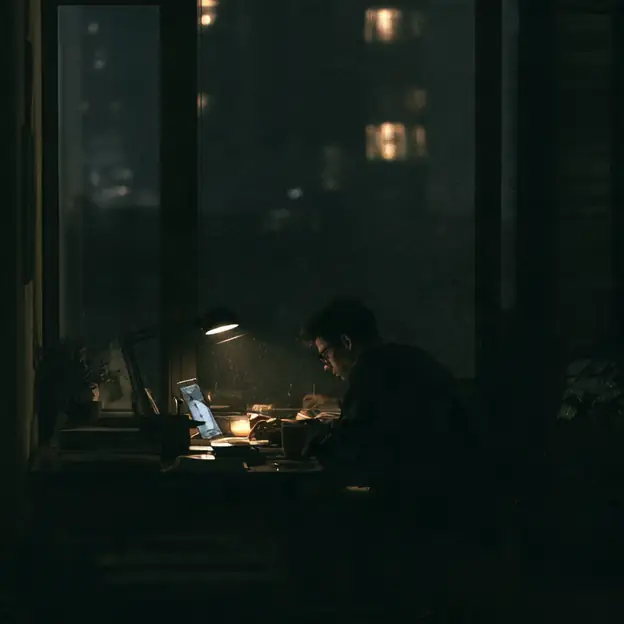
Seedance 2.5 example image showing a quiet interior lit by a warm reading lamp